









4.1
Free
3uTools
Repair tool for iOS devices

View an ad to download for free

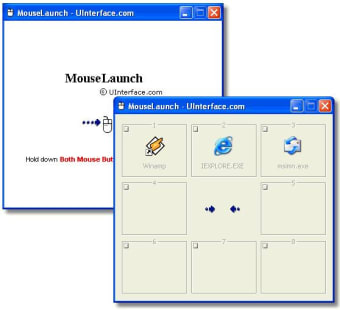
MouseLaunch is a program launcher that is activated by one mouse gesture. You can activate the launcher by holding down both mouse buttons at any location in Windows. Once the launcher activated, move the mouse cursor a little to the registered program/file (eight-direction) and click to launch. Once you experienced, it will takes less than 1 second for entire action. After you launch a file, the launcher will be minimized automatically not to disturb your further operation.
MouseLaunch supports a drag-and-drop to register your favorite program and file to the launcher panels. You can drag and drop a file from desktop area, Start menu, Quick Launch area, Windows Explorer and even from the favorites of the Internet Explorer. You can register up to 8 files for one section and change the location freely by right-clicking at the panel.
Trial version
4.9
Windows
Windows Vista
English
407
636.77 KB
View an ad to download for free
Have you tried MouseLaunch? Be the first to leave your opinion!
Add review
PC optimization within your control
Create Custom DVDs with DVDStyler Portable

Efficient Installer Creation with InstallBuilder for Qt
Efficient File Management with Keynesis Portable Sweeper

A full version program for Windows, by pepeizq.

Efficient Utility Tool for Windows Users
Create your own hierarchical trees for storing structured information

Install the latest driver for HP photosmart c4640
Overview of Windows 7 Enterprise Trial
Comprehensive Utility Tool for Windows Users

Streamline Your Browsing Experience